Webex App | Start a Conference Call
Overview
When you're on a phone call in the Webex App, you can pull someone else into the conversation without having to schedule a meeting. This creates an ad-hoc conference call where all parties can speak together.
This works whether you're using the Webex App on its own or paired with a Cisco desk phone (including the 9800 series).
Source: Webex App | Start a conference call — Cisco
Before You Begin
You must be set up with one of these calling services:
- Webex Calling
- Unified CM
- Service Provider-hosted calling
Not sure which you have? Contact your administrator or check Settings > Calling in the Webex App.
Maximum Participants
| Calling Service | Max Participants |
|---|---|
| Webex Calling | 6 participants |
| Unified CM | Set by administrator |
| Service Provider | 3–15 (varies by provider) |
Start a Conference — Desktop (Windows / Mac)
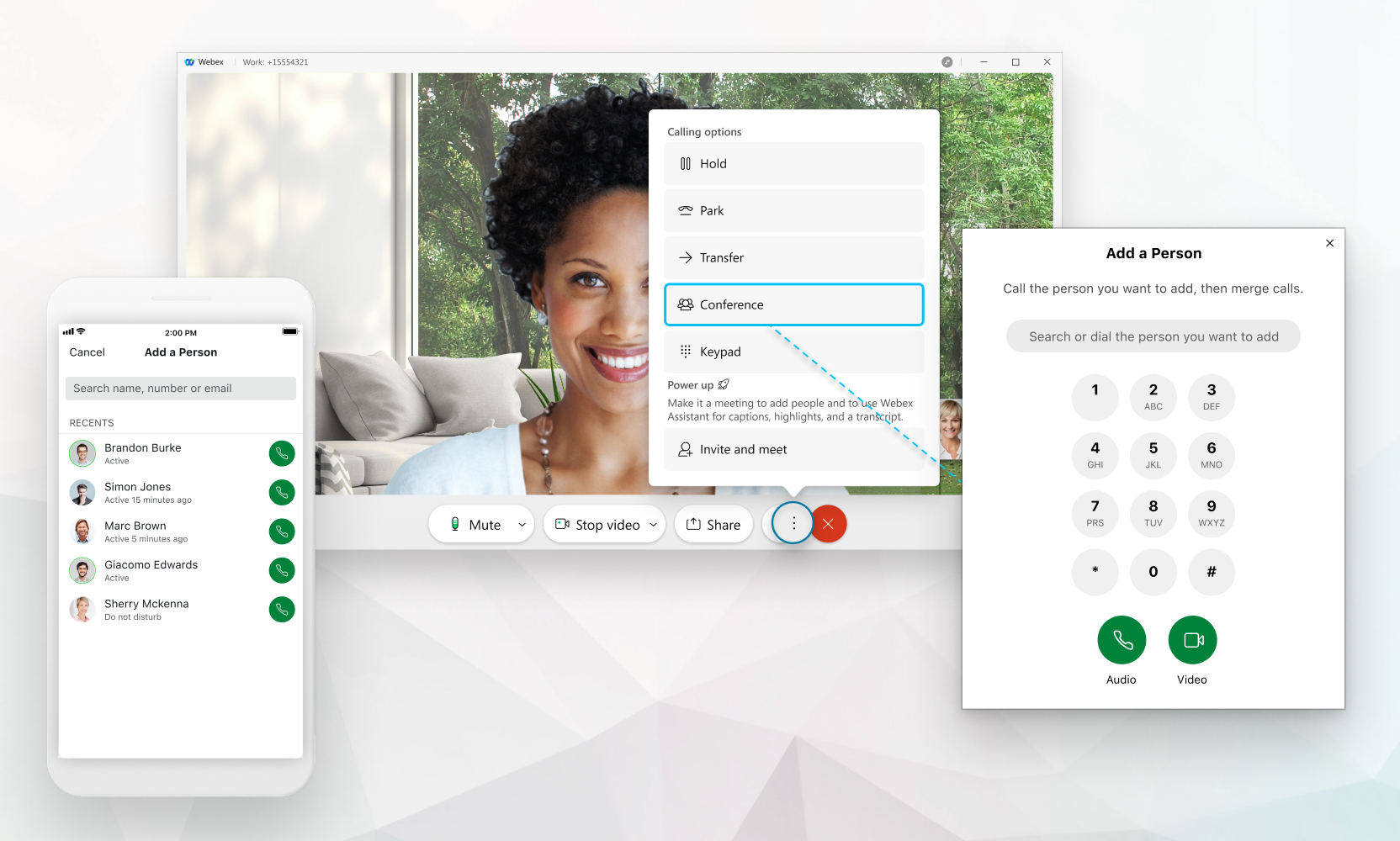
- During an active call, click More
 , then select Conference
  .
. - The first caller is placed on hold — let them know before you do this.
- Enter a phone number or search for a contact by name.
- Select Audio
 or Video
  call.
call. - Once the second party answers, click the Merge calls button
 to combine everyone into a conference.
 to see everyone on the call. You can add more people by repeating the process — click More > Conference again.
Start a Conference — Mobile (iOS / Android)
- During an active call, tap More, then tap Conference.
- The current caller is placed on hold.
- Enter a number or search for a contact, then choose Audio or Video.
- When the second party answers, tap Merge calls.
- Tap the Participant Panel icon to view and manage participants.
Using with a Cisco Desk Phone
If your Webex App is paired with a desk phone (Settings > Calling > Desk phone), conference management works the same way:
- The desk phone handles audio (handset or speaker)
- The Webex App handles call controls (conference, merge, participant list)
- This is the recommended way to manage conference calls on 9800 series phones (9861, etc.) since the native participant list is not available on these models
Good to Know
- When only 2 participants remain after someone leaves, the call automatically reverts to a one-to-one call.
- You can also select Invite and Meet to convert the call into a full Webex Meeting (requires a Meetings license).
- Call transfer and call park become available when the conference drops to two people.
Source: Webex App | Start a conference call by Cisco. Adapted for Perdigon Group customers. Last updated March 28, 2026.
Related Articles
Webex App | Remove Someone from a Conference Call
Overview During a conference call, you may need to remove a participant who was added accidentally or is no longer needed on the call. The Webex App lets you remove individual participants without ending the conference for everyone else. Source: ...Webex Calling | Cisco 9861 Phone Quick Start Guide
Overview Cisco 9861 Phone Quick Start Guide Cisco Desk Phone 9861 is available in two versions: the 9861 model that features Wi-Fi, Bluetooth®, and NFC capabilities, and the 9861NR model that doesn't support Wi-Fi, Bluetooth®, and NFC. Despite this ...Webex Calling | Cisco 9851 Phone Quick Start Guide
Overview Cisco 9851 Phone Quick Start Guide Cisco Desk Phone 9851 front view Hardware and buttons on the front Hardware Feature Purpose 1. Phone screen 3.7" color screen (Resolution 480 x 240) 2. Top 360 LED Indicates the states of call, message, and ...Webex App | Place, Receive, and Conference Calls (Mobile & Desktop)
Overview This guide covers how to place, receive, and manage phone calls using the Webex App on both mobile devices (iOS and Android) and desktop (Windows and Mac). You’ll also learn how to start conference calls and add or remove participants from ...Webex Calling | Conference Calls with Your Desk Phone
Overview This guide covers everything you need to know about conference calling when using a Cisco desk phone with the Webex App. Whether you're an executive assistant managing calls for your boss or a team member pulling colleagues into a ...