Webex Calling | Cisco 9851 Phone Quick Start Guide
Overview
Cisco 9851 Phone Quick Start Guide
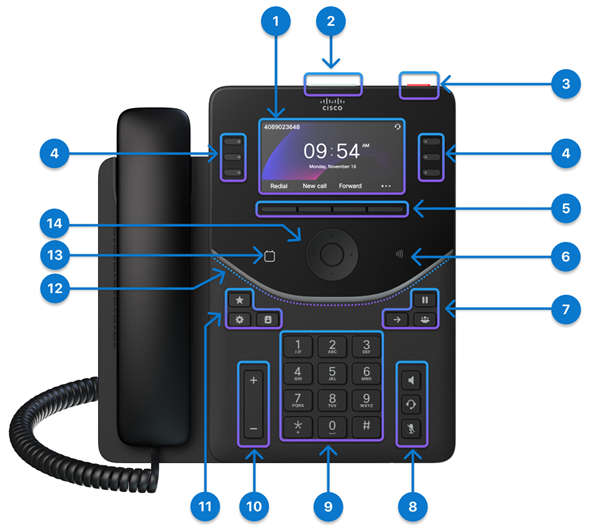
|
Hardware Feature |
Purpose |
|---|---|
|
3.7" color screen (Resolution 480 x 240) |
|
Indicates the states of call, message, and the phone. |
|
Press the button to place a service call, such as an emergency call, if configured. |
|
Access your phone lines, features, and call sessions. |
|
Access to functions and services. |
|
The location of the NFC tag. Scan the NFC tag to write onboarding information to the phones. The onboarding information can be preconfigured in an industrial NFC writer/reader or a mobile phone running a custom app. |
|
Hold/Resume Transfer Conference |
|
Headset Speakerphone Mute |
|
Use the keypad to input numbers, letters, and symbols. |
|
Adjust the handset, headset, and speakerphone volume (off hook), and the ringer volume (on hook and when the phone is idle). |
|
Favorite Settings Contacts |
|
Indicates the states of the phone, calls, and messages. |
|
Tap the Calendar button to open your calendar. This button is only accessible if your administrator has set up the Calendar service on your phone. |
|
The Navigation Cluster consists of the Navigation Ring and Select button. Used to scroll through menus, highlight items and select the highlighted item. |


*Perdigon does not have this button programmed by default.
For more information on the DP-9851: https://help.webex.com/en-us/article/29odsb/Get-started-with-Cisco-Desk-Phone-9800-Series#reference-template_8cd3ebf5-8829-49e2-b998-8814030b74ae
Source: https://help.webex.com/en-us/article/29odsb/Get-started-with-Cisco-Desk-Phone-9800-Series
Related Articles
Webex Calling | Cisco 9861 Phone Quick Start Guide
Overview Cisco 9861 Phone Quick Start Guide Cisco Desk Phone 9861 is available in two versions: the 9861 model that features Wi-Fi, Bluetooth®, and NFC capabilities, and the 9861NR model that doesn't support Wi-Fi, Bluetooth®, and NFC. Despite this ...Webex Calling | Cisco 9841 Phone Quick Start Guide
Overview Cisco 9841 Phone Quick Start Guide Hardware Feature Purpose 1. Phone screen 3.5" grayscale screen (Resolution 384 x 160) 2. Top 360 LED Indicates the states of call, message, and the phone. 3. Action button* Press the button to place a ...Webex Calling | Conference Calls with Your Desk Phone
Overview This guide covers everything you need to know about conference calling when using a Cisco desk phone with the Webex App. Whether you're an executive assistant managing calls for your boss or a team member pulling colleagues into a ...Webex Calling | Use CScan to test Webex Calling network quality
CScan is the network readiness tool designed for Webex Calling. Anyone can use it to test their network connection to Webex Calling. The Tool is located here: https://cscan.webex.com/ Introduction Prequalifying service availability for a customer ...Webex Calling | Features available by license type for Webex Calling
Webex Calling licenses can be assigned to Users or Workspaces depending on the feature requirements. With Webex Calling, there are three license options available, Professional, Standard, and Workspace. Professional license (User): Built for ...